Finite Element Analysis Results Anaimation
Import and visualize static and modal analysis results directly from CalculiX FRD files.
This tutorial demonstrates how to import simulation results and animate the deformed shape.
Animate Result Plot
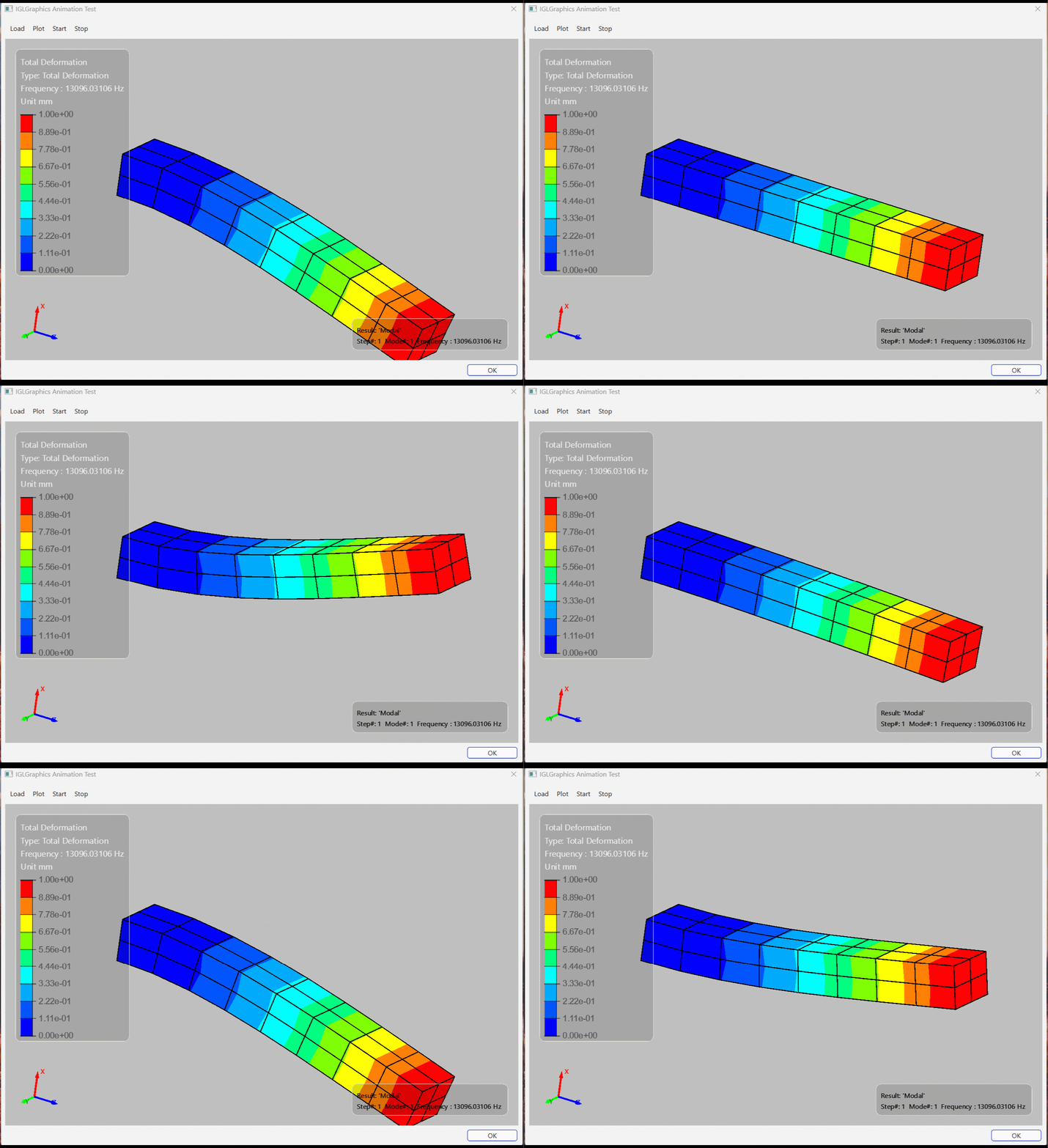
# Import necessary modules

from IGLGraphics.core.IGLImports import *

# Import IGLGraphics modules for display context and viewer
from IGLGraphics.core.IGLDisplayContext import IGLDisplayContext
from IGLGraphics.graphics.IGLViewer import IGLViewer
from IGLGraphics.cae.IGLCAE import IGLCAE
from IGLGraphics.core.IGLGlobals import IGLFEAResultType , IGLAnalysisType

class AnimationDialog(QDialog):

    startClicked = Signal()
    stopClicked = Signal()

    def __init__(self, parent=None):
        super().__init__(parent)

        self.setWindowTitle("IGLGraphics Animation Test")
        self.resize(1000, 700)

        # Create an instance of IGLViewer
        self.viewer:IGLViewer = None

        # Create an IGLDisplayContext associated with the viewer
        self.thecontext:IGLDisplayContext = None

        # Create an instance of IGLCAE, which is a CAE model handler
        self.wglcae:IGLCAE = None

        self._create_ui()
        self._connect_signals()

    # ---------------------------------------------------------
    # UI
    # ---------------------------------------------------------

    def _create_ui(self):

        main_layout = QVBoxLayout(self)
        main_layout.setContentsMargins(8, 8, 8, 8)
        main_layout.setSpacing(6)

        # =====================================================
        # Toolbar
        # =====================================================

        self.toolbar = QToolBar()
        self.toolbar.setMovable(False)

        self.action_load = QAction("Load", self)
        self.action_res = QAction("Plot", self)
        self.action_start = QAction("Start", self)
        self.action_stop = QAction("Stop", self)

        self.toolbar.addAction(self.action_load)
        self.toolbar.addAction(self.action_res)
        self.toolbar.addAction(self.action_start)
        self.toolbar.addAction(self.action_stop)

        main_layout.addWidget(self.toolbar)

        # =====================================================
        # Central Widget
        # =====================================================

        self.viewer = IGLViewer()
        self.thecontext = IGLDisplayContext(self.viewer)

        main_layout.addWidget(self.viewer)

        # =====================================================
        # Bottom Buttons
        # =====================================================

        button_layout = QHBoxLayout()
        button_layout.addStretch()

        self.ok_button = QPushButton("OK")
        self.ok_button.setFixedWidth(100)

        button_layout.addWidget(self.ok_button)

        main_layout.addLayout(button_layout)

    # ---------------------------------------------------------
    # Connections
    # ---------------------------------------------------------

    def _connect_signals(self):

        self.action_load.triggered.connect(self.on_load)
        self.action_res.triggered.connect(self.on_res)
        self.action_start.triggered.connect(self.on_start)
        self.action_stop.triggered.connect(self.on_stop)

        self.ok_button.clicked.connect(self.accept)

    # ---------------------------------------------------------
    # Slots
    # ---------------------------------------------------------

    def on_load(self):
        self.wglcae = IGLCAE()
        self.wglcae.SetContext(self.thecontext)  # Set the display context for the CAE model

        #self.wglcae.LoadModel(r"frd\Beam.frd")
        #self.wglcae.DisplayResults(IGLFEAResultType.SX,1,1,'MPa', defoscale=5.0)

        self.wglcae.LoadModel(r"frd\beamf.frd")
        #self.wglcae.DisplayResults(IGLFEAResultType.MODESHAPE,1,1,'mm', defoscale=2.0,analysis_type=IGLAnalysisType.MODAL)

        self.viewer.OnZoomFit()
        self.viewer.FrontView()
        self.viewer.update()

    def on_start(self):

        print("Animation Started")
        self.startClicked.emit()

        self.wglcae.StartAnimation(3)

    def on_stop(self):

        print("Animation Stopped")
        self.stopClicked.emit()

        self.wglcae.StopAnimation()

    def on_res(self):
        #self.wglcae.DisplayResults(IGLFEAResultType.SEQV,1,1,'MPa', defoscale=1.0)
        self.wglcae.DisplayResults(IGLFEAResultType.MODESHAPE,1,1,'mm', defoscale=2.0,analysis_type=IGLAnalysisType.MODAL)

# =============================================================
# Test
# =============================================================

if __name__ == "__main__":

    app = QApplication(sys.argv + ['-platform', 'windows:darkmode=1'])

    dlg = AnimationDialog()
    dlg.exec()